Ping protection
Powerful and highly customizable ping-protection module to protect members/roles from unwanted mentions with moderation capabilities.
Can not display module overview: Module "ping-protection" not found.Features
- Protect your users and roles from unwanted (future) pings by sending a customizable warning message
- Completely block pings with a native AutoMod integration (if enabled) together with a custom block message
- Protect every member with a protected role from (future) pings (if enabled)
- Whitelist specific channels, users and roles for pinging
- Customize the moderation actions for repeatedly pinging protected entities with a customizable punishment log message
- Customize how long and if you want data to be stored, such as the pings history
Setup
Set up protected roles and members
The protected roles and members are who will be protected from pings, and when someone pings a proteted role or user, then a warning message is sent or blocked by AutoMod depending on the configuration.
How to start setting up protected roles and members:
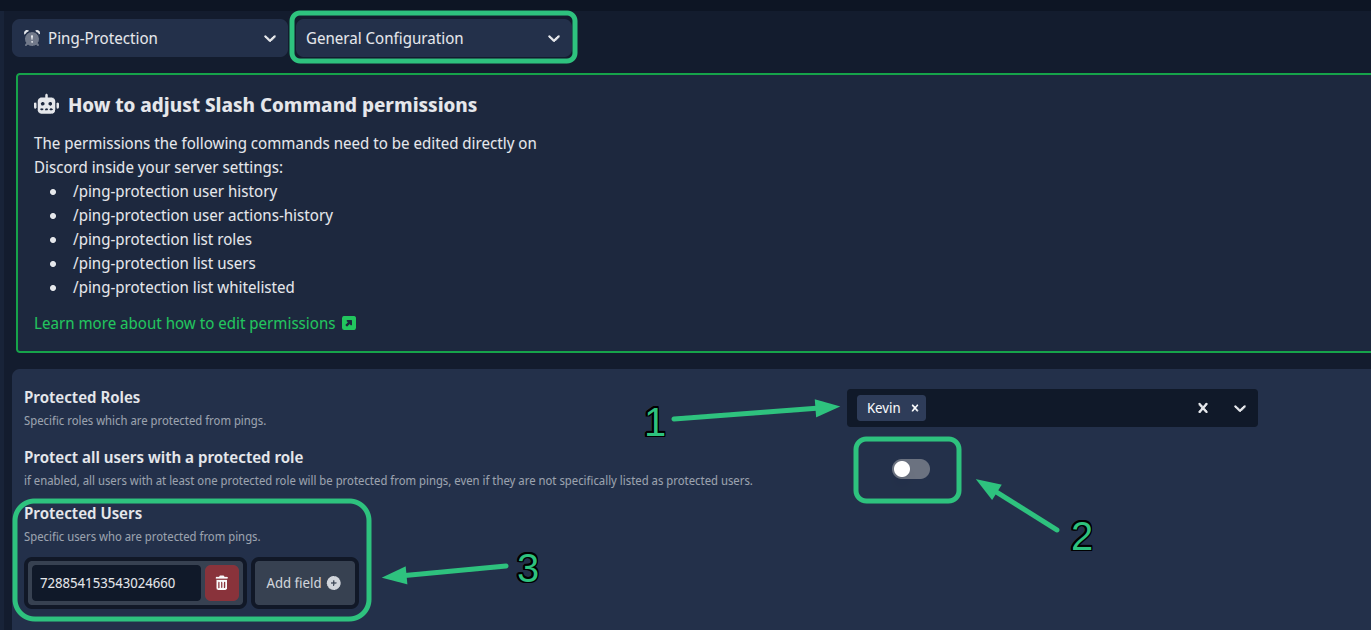
- Select the role(s) you do not allow members to ping in the 'Protected Roles' field.
- You can optionally select if all members with that role should automatically be protected as well with the 'Protect all users with a protected role' - This field is enabled by default.
- Select the member(s) you do not allow to be pinged by entering their user ID's in the 'Protected Users' fields - You can add multiple members by clicking on the 'Add field' button for each individual member.
You can view the exact places on this image below: